
School Boxes. Memories… those pieces of art we want to cherish forever with amazing intentions of having a garage wall full at their graduation in 10 years.. we got them. I personally do not want to keep 13+ years of amazing drawings that my little Picasso has made. I love you, kids.. but nope… but I know deep down, you want me to keep a few!
Now… I do want to keep your star student awards (x2) that you received in Art this past school year, because this Momma has an Art minor from her fancy private collage days and my heart explodes knowing you love art as much as I do. So… what do we do with all of this goodness that I have decided to keep? Million dollar question. Answer: School memory boxes! Don’t worry.. I have our backs. I have this ALL planned out. The school boxes idea was taken from Pinterest, but I created a step-by-step plan for us, with a special “Jenn how-to” flare!
Before I started assembling – I got everything out on the kitchen floor, tape and scissors included. Even if your kiddo is not quite starting school, you can start this at any grade and work forward and backwards!

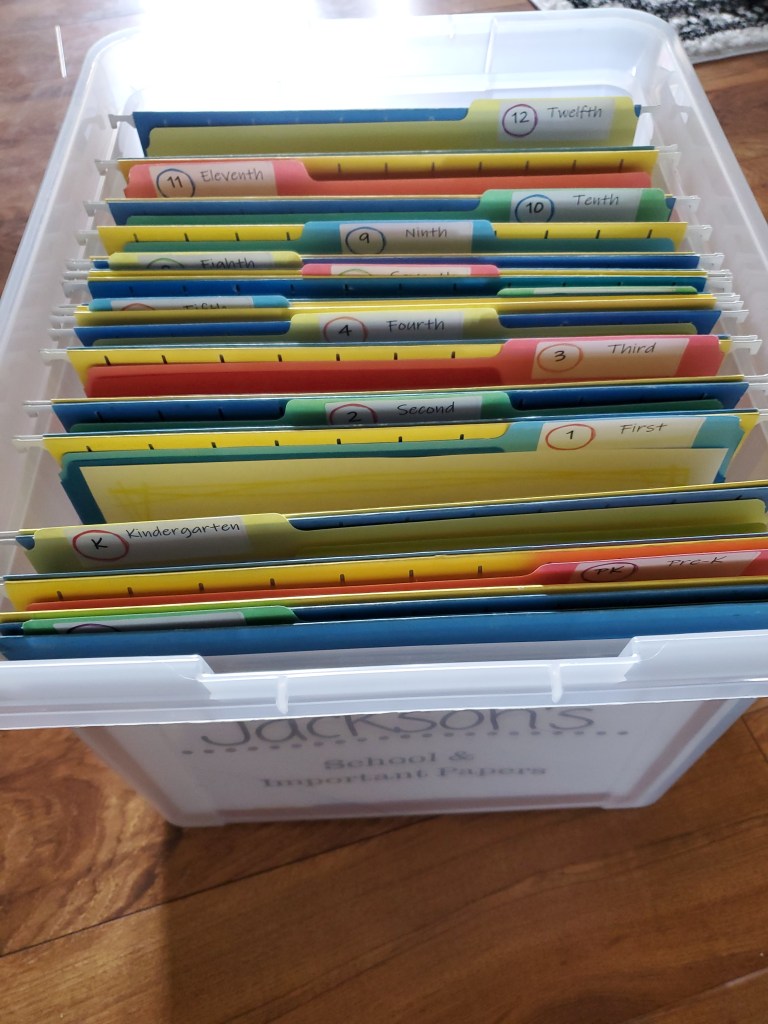
Step 1: Get the clear hanging file folders box.
If you have multiple kids, or you can round up a friend or two, get the 4 pack of these boxes for a better deal. I personally bought the 4 pack, kept 2 for myself and sold the other 2.
Step 2: Get hanging file folders. You could be fancy and color code. I asked my Mom if she had any extra from her 30 years of filing and I hit the lottery when she handed me 40 from her ‘stache.’ If you need to order, there are lots of color options. Link provided below!
Step 3: Individual file folders – I am going to have 2 / grade. One for art, one for awards and important papers.
Step 4: Label those folders. If you started before me and have the Pre-K stuff not already shoved in a box, you are winning right now! Do a Pre-K, they did cute shit back then! I am going with the grades.. K – 12. After 12, they are on their own for storing their awards and cool things from wherever they go next. I used and designed for Address Labels for Laser/Inkjet Printers, White, 1 x 2-5/8 inch label. If you have more than one kid you are making these boxes for, print one set on the labels sheet, then flip over and print on the other blank ones on the sheet.
Download the file folder grade stickers (.pdf)
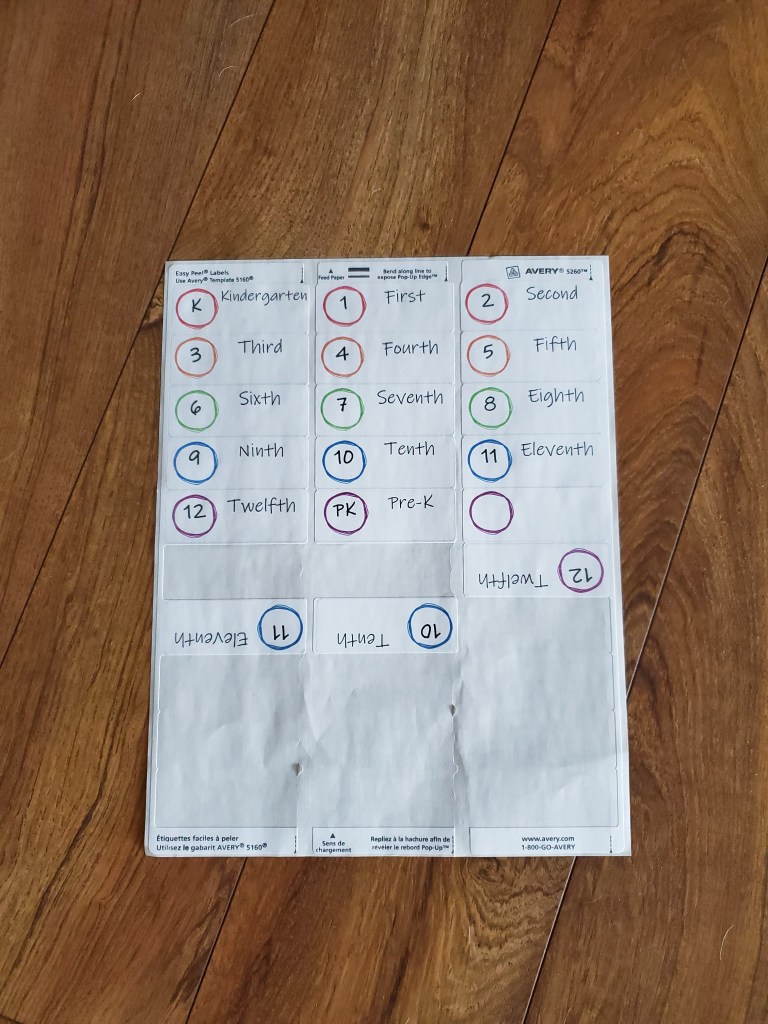
Step 5: Print the folder pages! I went with this route. I am KEEPING IT SIMPLE. As cute as it is right now as we just finished Kindergarten, I will not have time or have cute stories from when I probably will not like them when they are pre-teens full of attitude! (sorry!)
A really good idea a friend passed to me.. if you have multiple children, print off ALL copies of these pages for EACH kid NOW. Then.. if you don’t start their box at this time, put it in a future year.. that way you are set on having them done.. and they will MATCH! Again, sorry, I have some obsessiveness about myself, I like things to match.
Download the folder sheets (.pdf) – Updated

Step 6: Fill
that FOLDER. Yep, folder…. Not the whole
box… again.. FOLDER!
Here is what goes in the folder. A
couple of awards… report cards… year book… and any compare charts.. and TWO of
your favorite art pieces. Then… the school pictures you ordered. You will at
the very least want those pictures when you are setting up for that grad party
in how ever many years. You will thank yourself then! Lastly – some pictures. I did the first day
of school and last day of school.. yes, I PRINTED those out.. That is it.
Step 7: Put it in a place you will remember where it was in a few months when the first day of school rolls around!
Extra step: Extra memories sheet. After chatting with a few Moms, we decided that we love to see how our kiddos write their names and how much it changes from each year. It is also fun to know what activities and who their friends were that year. I created a sheet to capture all of this! (Thank you Mommas for help on this!!) Download the added memories sheet here.
Now, if you want to get even more efficient. Get yourself a thumb drive. Make a folder for each grade. Drop some pics off of your phone in the folder and boom.. ultra prepared for the grad party slide show you probably won’t make.. but you will have the pics to show their future boyfriend/girlfriend/husband/wife/partner! 😊
Once the folder is done. Shut the box and walk away.. until the next grade!
Resources:
Plastic file boxes: https://amzn.to/41Q8Tkb
Single file boxes: https://amzn.to/3RKa8wL
Hanging file folders: https://amzn.to/48AS1AN
Plain file folders: https://amzn.to/3H7WqyT
Mailing labels: https://amzn.to/319gFoX
Folder sheets for each grade: Download the folder sheets (.pdf) – updated
Labels for each grade individual folders: Download the file folder grade stickers (.pdf)
Added memories sheet: Download the added memories sheet (.pdf)
Have fun!
~ j.
 Paper. Pretties & Dirt. The blog.
Thank you for this! I’m one of those moms who has good intentions but rarely follows through (time gets away from me). My kids don’t have a baby book, so I was feeling guilty. My son is starting first grade next month and my daughter will be starting Pre-K. My file boxes and hanging folders are arriving from Amazon today, so I was searching pinterest for ideas for labeling everything. I found your blog post and it caught my eye because it was cute yet simple. I totally agree that kids will become more stubborn and I will get busier, so the simpler the better! And I happened to buy the exact boxes and folders that you linked to, so I think this is fate 😉 Thank you so much for making my life even easier with the printables!!
LikeLiked by 1 person
Hi Angie – Thank you so much for your comments! I do agree, that if it is simple for us, we’ll tend to do it. I hope your kids’ school year is going awesome!
LikeLike
Thanks so much for your downloads. I’m making memory/school boxes for my grandkids. The sticker for 4th grade says Fourth but the memory page says Forth. Ooops!
LikeLike
Hello! Thank you for your comment. I did just update the file for the folder pages! Please let me know if you have any questions or comments or need assistance with this. Thanks!
LikeLike
Anyway we could change the forth to fourth grade?? and have as a separate document
LikeLike
Hello! Thank you for your comment. I did just update the folder pages file and that should reflect the updated spelling of “fourth!”
When printing- when you open up the .pdf, go to the “fourth grade” page, then choose “current page” in your settings and it should print just that one! Feel free to reach out with any additional questions/comments. Thanks!
LikeLike